The Morning Sarah Lost Two Hours to a Folder Called "Contracts (OLD)"
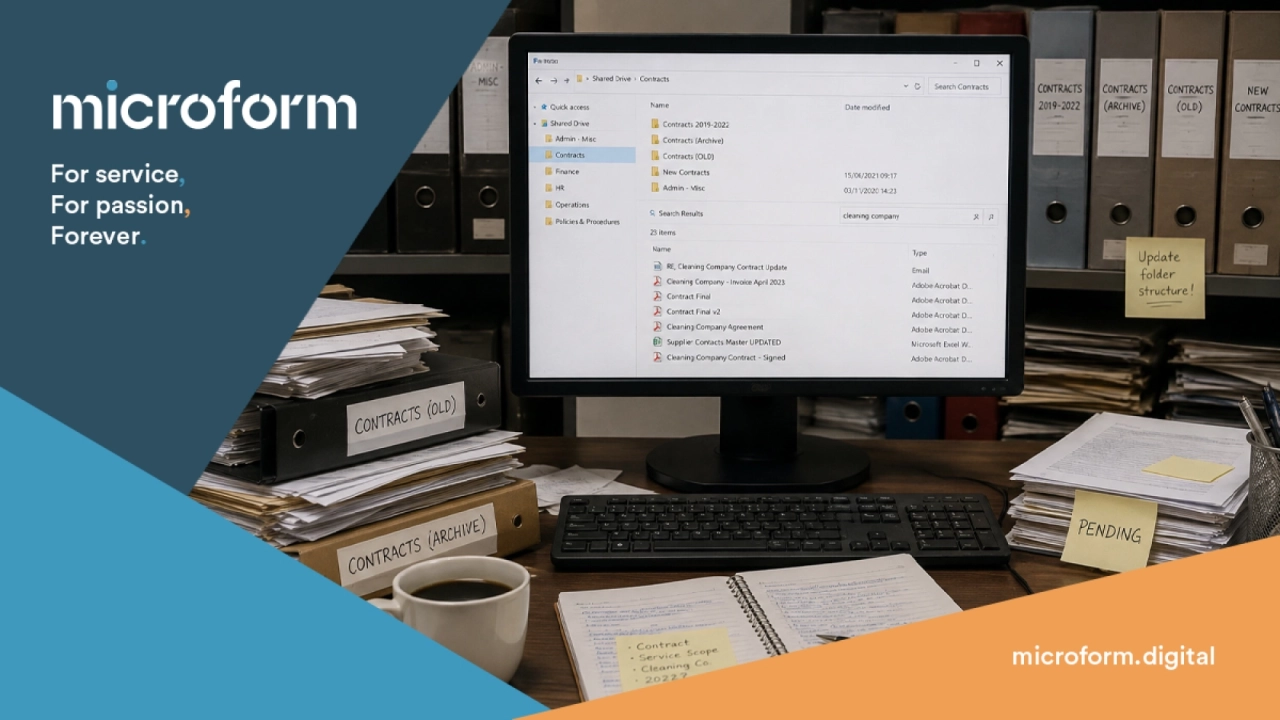
[Sarah is a fictional character, but her morning will be familiar to anyone who has spent time looking for something on a shared drive.]
Sarah is good at her job.
She has managed the office for four years. She knows where things are, who to call when something breaks, and which supplier will actually turn up when they say they will. She is the person colleagues come to when they cannot find something, because she usually can.
Usually.
It is 9.15 on a Tuesday morning and Sarah has a problem. The facilities manager has just called. There is a dispute with a cleaning contractor over the scope of their service agreement, and he needs to know exactly what the contract says. The contractor is coming in at eleven. He needs the answer before then.
Sarah goes to the shared drive.
The shared drive
The shared drive has been there longer than Sarah has. It was organised, at some point, by someone who is no longer with the company, according to a logic that has not been fully documented anywhere. Over the years it has been added to, reorganised partially, added to again, and reorganised again by someone who meant well but did not finish the job.
There is a folder called Contracts. Inside it, there is a folder called Contracts 2019-2022, a folder called Contracts (Archive), a folder called Contracts (OLD), and a folder called New Contracts which was created in 2021 and has not been touched since. There is also a folder called Admin - Misc which Sarah has learned, over time, to treat with suspicion.
She starts with the most recent-looking folder. The cleaning contractor is not there. She tries Contracts (Archive). There are 47 documents in it, named with varying degrees of helpfulness. Several are called Contract Final. Two are called Contract Final v2. One is called Contract ACTUAL FINAL USE THIS ONE, which is promising, but turns out to be a catering agreement from 2018.
It is 9.31.
The search bar
Sarah tries the search bar. She types in the name of the cleaning company.
The search returns 23 results. Several are emails. Some are invoices. Three appear to be the same document saved in different locations at different times, and she cannot immediately tell which is the most recent version. One result is a spreadsheet called Supplier Contacts Master UPDATED which she did not know existed and which raises several questions she does not have time to explore right now.
She opens the documents that look most like contracts. One is the right supplier but the wrong service. One appears to be a draft with several clauses marked for review, which is not ideal. One is a signed agreement, which looks right, but it is 34 pages long and she needs to find the section on service scope before 11 o'clock.
She starts reading from page one.
It is 9.47.
The colleague
At some point Sarah remembers that Derek in finance dealt with this contractor when the contract was first set up. Derek has been with the company for eleven years. Derek knows things.
She finds Derek at the coffee machine and explains the situation. Derek nods thoughtfully and says he thinks the contract might actually be saved under the contractor's parent company name, not the trading name, which would explain why it is not coming up in search. He also thinks there might be a more recent version that was signed after a renegotiation in 2022, which may or may not be on the shared drive, because he remembers emailing it to someone but cannot remember if it was ever properly filed.
Sarah goes back to her desk.
It is 10.04.
The resolution
She finds it at 10.38. It was in Contracts (OLD), which turned out not to be old at all, saved under the parent company name as Derek suggested, in a subfolder called Pending that nobody had moved it out of. The relevant clause is on page 22. She screenshots it and sends it to the facilities manager with nineteen minutes to spare.
The meeting goes fine. The issue is resolved. Nobody outside of Sarah's morning knows that any of this happened.
But Sarah has lost the best part of two hours to a filing problem. She has a meeting she is now underprepared for, three emails she has not answered, and a low-level headache that will probably last until lunch.
This will happen again. It happens every week, in one form or another. It happens in offices everywhere, to people like Sarah, who are good at their jobs and should not have to spend their mornings in Contracts (OLD).
There is a better version of that morning
AI-assisted document intelligence will not reorganise the shared drive by itself, and it will not undo four years of inconsistent filing conventions overnight. But it can make a significant difference to what happens when someone like Sarah needs to find something.
A natural language search would have allowed her to describe what she was looking for in plain English and receive an answer linked directly to the relevant document and page. AI-assisted classification could have brought order to the folder structure before the search even began. Automatic bookmarks would have taken her to page 22 of a 34-page contract in seconds rather than minutes.
The contract was there all along. The information existed. The problem was never the document. It was the time and effort required to get to it.
For organisations where this kind of search happens dozens of times a day, across teams of people, the cumulative cost is considerable. Not just in time, but in the quiet frustration of knowing that something should be easier than it is.
Where to start
AI document intelligence can be applied to an existing document collection without rebuilding everything from scratch. The most effective starting point is usually the collection that causes the most friction: the shared drive that everyone finds difficult, the contract archive that requires a small expedition every time someone needs to check a detail, the folder structure that only makes sense to people who were there when it was created.
Start with a defined collection and a real set of questions. The goal is not a perfect archive. It is a document collection where Sarah can find what she needs before the contractor arrives.
Find out more about our Document Intelligence and Document Intelligence Assistant services, or get in touch to discuss how we could help with your document collection.